The hum of a laptop fan, the soft glow of a monitor — it’s the soundtrack to countless developers wrestling with Git.
And let’s be honest, Git has always felt like that cryptic friend who speaks in riddles. Commands are easy enough to type, sure, but why? What’s truly happening when you git add or git pull? Most resources throw walls of text at you, hoping something sticks. Not this time.
A new free platform has landed, and it’s not just another tutorial. It’s an experience. Think of it as a digital dojo for Git, built entirely in your browser. The creator, tired of the same old abstract explanations, decided to build something that lets you see and do. And the result? A genuinely interactive journey into the heart of version control.
The Four Pillars of Git Enlightenment
This isn’t just a collection of links; it’s a carefully constructed learning environment. It breaks down the notoriously steep Git learning curve into digestible, interactive chunks. We’re talking three distinct modes, plus a sandbox so potent it feels like a magic trick.
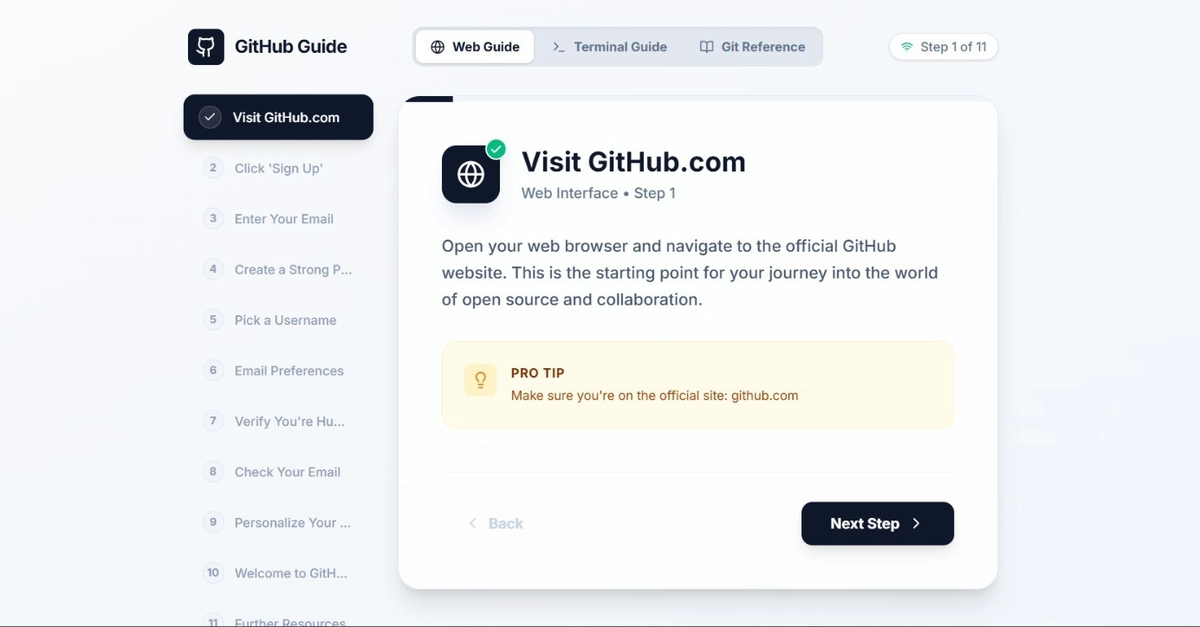
First up, the Web Guide. This is your visual starting point, for those who want to ease in. It’s a step-by-step walkthrough covering the absolute basics, from creating a GitHub account to navigating the web interface. No terminal commands needed here, just pure, visual onboarding.
Then, brace yourself for the Terminal Guide. This is where things get real. Sixteen steps, each a carefully crafted lesson in using the command line. It doesn’t just tell you what to type; it walks you through installing the GitHub CLI, authenticating, cloning repos, branching, staging, committing — the whole nine yards. Each step comes with a PRO TIP, because who doesn’t love a shortcut?
But what if you just need to look something up? Enter the Git Reference. This isn’t just a list; it’s a searchable encyclopedia of 25 core Git commands. It categorizes them neatly (Setup, Daily Work, Branches, Mistake Fixing – you name it) and for each command, it offers a functional description, the standard syntax, and a peek at its “Area Operations Visualizer” and “File State Transition.” This is where the abstract becomes concrete.
The Crown Jewel: The CLI Sandbox
This is where the magic happens. The CLI Sandbox is an embedded terminal. You type real Git commands, and you see the simulated file state changes happen live. It’s like having a miniature Git universe at your fingertips. Four distinct zones — Workspace, Staging Area, Local Repository, and Remote Repo — visibly react to your every command. You can run git init, git add, git commit with a single click, or go wild with your own commands. It’s interactive learning turned up to eleven.
The crown jewel. An embedded terminal where you type real Git commands and watch simulated file state changes happen live across four zones.
Think of it: no more fumbling with local test repos, no risk of breaking something important. Just pure, unadulterated experimentation. This is how you build intuition. This is how Git stops being a mystery and starts becoming a tool you understand deeply.
Why This Matters: Beyond the Hype
We’re past the point of AI being a buzzword. It’s a fundamental platform shift, and tools like this, even without explicit AI in them (yet!), represent that shift. They’re democratizing complex knowledge. They’re taking something that felt like an arcane art and making it accessible.
For years, the developer experience with tools like Git has been… let’s just say, a mixed bag. We’ve accepted a certain level of friction as the cost of admission. But what if that friction could be smoothed out, not by dumbing down the concepts, but by presenting them in a way that matches how our brains actually learn? This platform is a perfect example of that evolution. It’s about building the right tools to help developers thrive, not just survive.
It reminds me of the early days of the web, when navigating online felt like being lost in a library without a catalog. Then came search engines, interactive guides, and visual browsers. This Git platform is that kind of leap for version control. It’s a clear signal that the future of developer tooling is about empathy, interaction, and making the complex feel intuitive.
What’s on the Horizon?
The creator isn’t stopping here. Plans include saving progress (finally!), adding quiz checkpoints to solidify understanding, and guides for .gitignore and SSH key setup. This isn’t a finished product; it’s a dynamic, evolving resource.
It’s deployed on Vercel, built with React and TypeScript, and styled with Tailwind CSS – a modern stack for a modern approach. The call to action is clear: try it, give feedback, and if there’s enough interest, it’ll go open-source. That’s the beauty of the dev community: we build, we share, we iterate.
This platform isn’t just teaching Git; it’s teaching a new way to learn. And that, my friends, is a very exciting prospect indeed.
**
🧬 Related Insights
- Read more: Pocket AI: Google I/O Hints at Mobile Intelligence Revolution
- Read more: Headless CMS 2026: The Split Between Dev Frameworks and Enterprise Orchestrators
Frequently Asked Questions**
Is this platform really free?
Yes, the live application is completely free to use as a browser-based learning tool.
Will this replace my Git instructor?
While it’s an incredibly powerful interactive resource, it’s designed to supplement, not replace, human instruction or formal training. It excels at building foundational intuition and understanding command mechanics.
Can I contribute to this project?
Yes, the creator has indicated that if there’s sufficient interest, the repository will be made open-source, inviting community contributions.