The slick, modern wizard installer for a Windows app — you know the one. The one that doesn’t just slap files onto your C: drive but offers custom install locations, creates desktop shortcuts with sensible defaults, and maybe even asks if you want it to start with Windows. Yeah, that one. Because as Spotube discovered, just spitting out an executable isn’t the end of the road for desktop app development, especially on Windows. It’s barely the beginning. You’re not just building software; you’re building an experience, and that means making it easy for users to install, update, and uninstall without wanting to hurl their computer out the window.
And here’s the thing: most folks building Flutter desktop apps? They’re probably not thinking about this level of polish. They’re wrestling with the core framework, getting widgets to line up, and praying the latest SDK update didn’t break everything. So, when Spotube points to its solution involving fastforge, Inno Setup, and the ever-useful Chocolatey package manager, it’s not just a technical deep-dive; it’s a look at how a project is actually maturing from a hobbyist endeavor into something that could realistically compete on the desktop stage.
Who’s Actually Making Money Here?
Let’s cut through the jargon. fastforge is an orchestration tool. Inno Setup? It’s been around forever, a workhorse for creating installers. InnoDependencyInstaller? A helper script. Chocolatey? A package manager for Windows, essentially making software distribution easier. The money, if any, is in the app being distributed – Spotube itself. The tools are enablers, not profit centers in this context. They solve the problem of getting a polished product into users’ hands, which, in turn, is what drives adoption and, eventually, revenue for the app developer. It’s the plumbing, not the mansion.
The Windows App Installation Problem, Solved (Sort Of)
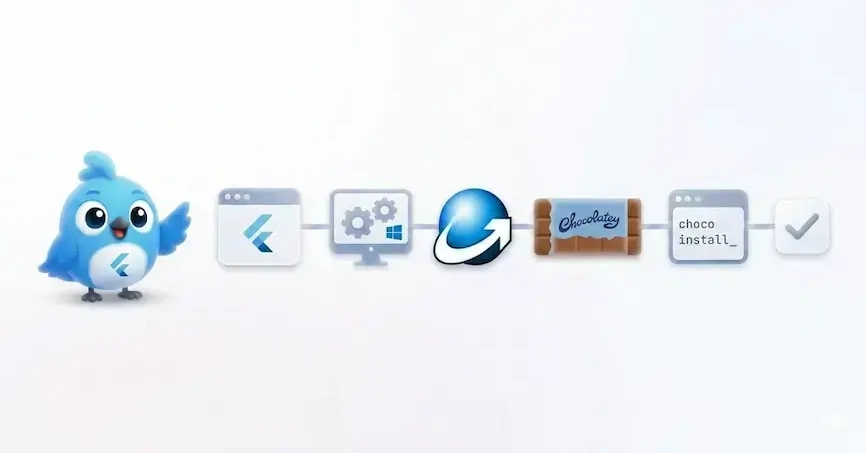
Spotube’s approach is refreshingly pragmatic. They’ve boiled down the messy business of Windows app packaging into a few core components. The goal? A pipeline that spits out a professional installer (.exe), injects branding and version info, bundles necessary runtime dependencies (looking at you, VC++ runtime!), and churns out a Chocolatey package. They’re also hinting at WinGet integration down the line, which is smart, but as they rightly point out, that’s a whole other beast involving public repositories and PRs.
The real secret sauce, at least for the installer itself, appears to be fastforge acting as the conductor for an Inno Setup script template. It’s a classic templating approach: you define the parameters — app_id, publisher, display_name — and the template fills in the blanks. This isn’t exactly rocket science, but it’s the application of it that matters. For anyone who’s wrestled with creating a Windows installer from scratch, this looks like a godsend. They even link to the community-contributed Inno script, which, as they state, is good enough for “90% of Flutter desktop apps.” That’s a powerful endorsement of reusability.
The Inno installer is the common denominator for both channels.
This little gem of a sentence underscores the strategy. Build one strong installer, then figure out how to package that for different distribution methods. It’s about not reinventing the wheel for every single channel. Smart.
Bundling the Annoying Bits: VC++ Runtimes
One of the perennial headaches for Windows developers is dependencies. That stubborn VC++ runtime that your app just won’t run without unless it’s already on the user’s system. Spotube’s solution uses the InnoDependencyInstaller helper, which sounds like it was custom-built for this exact problem. It’s a way to bundle those nagging prerequisites directly into the installer, so the user gets a complete package. No more “runtime not found” errors after installation. This alone would make many developers’ lives a lot easier. It’s the digital equivalent of including batteries with a toy.
The Chocolatey Connection
Distributing via direct .exe downloads is fine for a start, but for power users, package managers are king. Chocolatey, now with Microsoft’s blessing and backing as a preferred Windows package manager, offers a centralized way to install, upgrade, and manage applications. For Spotube to generate a .nupkg file – the format Chocolatey uses – means they’re aiming for that next level of accessibility. It’s about making it as easy as choco install spotube for those who are already in that ecosystem. This move signals a serious intent to be a player in the desktop application space. You don’t bother with Chocolatey if you’re just dabbling.
So, while the technical specifics of fastforge orchestrating an Inno Setup script might sound niche, what Spotube has achieved is a blueprint for how to professionally package and distribute a Flutter desktop application on Windows. It’s the unglamorous but absolutely essential work that separates a cool demo from a viable product. And honestly, that’s more interesting than another AI hype cycle.
🧬 Related Insights
- Read more: Twelve Bucks Buys an AI That Actually Works
- Read more: Escape the Framework Trap: Master the Engine-Adapter Pattern for Truly Adoptable Open-Source Tools
Frequently Asked Questions
What does fastforge do? Fastforge is a tool used to orchestrate the packaging process for Flutter desktop applications, managing tasks like building the executable and generating installers.
How do I install Inno Setup?
You need to download and install Inno Setup from its official website, and ensure the Inno Setup Compiler (iscc) is in your system’s PATH environment variable for command-line use.
Is this method suitable for all Flutter desktop apps? The article suggests that the provided Inno Setup script template works for 90% of Flutter desktop apps without modification, implying it’s a broadly applicable solution for Windows packaging.