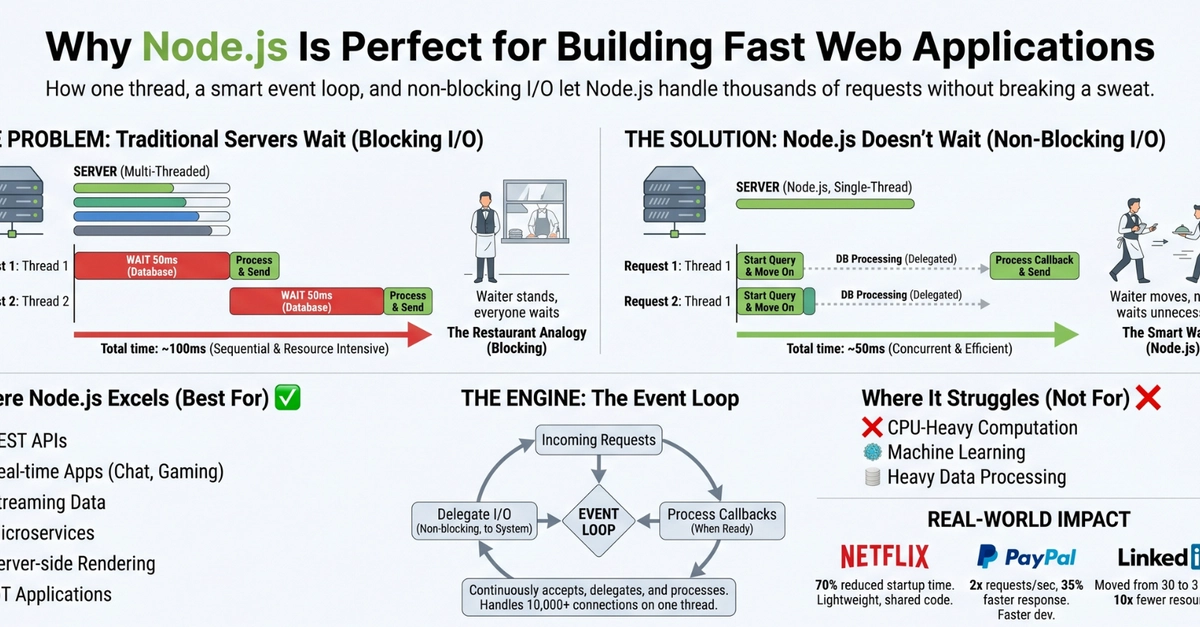
We all did it. You build your Node.js app. You deploy it. You grab a beefy 8-vCPU instance, feeling smug. Job done, right?
Wrong. Deep down, you know Node.js is single-threaded. Your shiny new cores? Mostly collecting dust.
And that’s where clustering swoops in, like a knight in slightly rusty armor. The idea: run multiple Node.js processes, each on its own CPU, all sharing the same port. Sounds good. Too good?
It’s not magic. It’s Node’s cluster module. Simple. Effective. Mostly.
The Two Faces of Clustering
When you boot up the cluster, you get two types of processes:
The primary process. Think of it as the beleaguered middle manager. It spawns the workers, watches them, and yells if one falls over. It doesn’t actually do any of the app’s heavy lifting – no database connections, no serving requests. If the primary dies, the whole party’s over. Nice.
And then there are the workers. These are the grunt workers, the ones actually running your code, talking to your database, and handling those precious user requests. They’re oblivious to their siblings, each thinking it’s the only game in town.
Key Facts for the Uninitiated:
- 8 vCPUs means 9 processes: 1 primary, 8 workers.
- Each worker is a silo. Own memory. No sharing.
- They share a port, but connections? Distributed. Round-robin, if you’re lucky (Linux). Windows? Who knows.
- Primary is dumb. Workers are isolated. They can’t even whisper to each other.
So, You Want to Cluster?
Here’s the basic drill, ripped straight from the docs (but explained better):
import cluster from "node:cluster";
import os from "node:os";
import app from "./src/app";
import { connectDB } from "./src/config/database";
import { createServer } from "http";

const PORT = process.env.PORT || 3000;
const enableCluster = process.env.NODE_ENV === "development"; // Or production, really

if (enableCluster && cluster.isPrimary) {
    const numWorkers = os.cpus().length;
    console.log(`Master ${process.pid} is running`);

    // Fork workers.
    for (let i = 0; i < numWorkers; i++) {
        cluster.fork();
    }

    cluster.on("exit", (worker, code, signal) => {
        console.log(`worker ${worker.process.pid} died — respawning`);
        cluster.fork(); // Spawn a new one, obviously
    });
} else {\n    // Workers can share any TCP connection\n    // In this case it is an HTTP server\n    const httpServer = createServer(app);\n    connectDB().then(() => {\n        httpServer.listen(PORT, () => {\n            console.log(`Worker ${process.pid} started and listening on port ${PORT}`);
        });
    });
}
This code sets up your primary to fork workers equal to your CPU count. If a worker flakes out, it just… respawns it. Simple. Your workers then run the actual app logic, including database connections and server listening. You can peek at process.pid to see which worker is doing what. It’s a clean separation. Or at least, that’s the pitch.
The Upside: More CPU usage. Better throughput for CPU-bound tasks. Built-in crash recovery. What’s not to love?
The Downside: This is where the wheels start to wobble. Each worker has its own RAM. Your in-memory caches? Poof. Gone, silently. Sessions? Forget about them if they’re just in worker memory. Debugging becomes a nightmare: ‘Which worker logged that cryptic error?’ And, as mentioned, primary failure takes everything down.
When Real-Time Gets Messy: Stateful Connections
REST APIs? Fine. Stateless. The database is the truth. Any worker can handle any request. Easy.
But then come WebSockets. Or Server-Sent Events. Suddenly, everything breaks.
A user connects via Worker 1. Their WebSocket session, their identity, their very existence in your app lives in Worker 1’s memory. Then, for whatever reason (load balancer quirks, network magic), the next request from that same user lands on Worker 2. Worker 2 has no idea who this person is. The real-time connection is broken. The message doesn’t get delivered because Worker 1 has the socket, Worker 2 is clueless, and they can’t even chat amongst themselves to figure it out.
A TCP socket lives inside one process. This is the fundamental issue with stateful connections across workers.
This is where “sticky sessions” or more sophisticated load balancing comes in. The idea is to route a user’s subsequent requests to the same worker that handled their initial connection. This sounds like a fix, but it introduces its own set of problems. It’s like building a castle wall around each worker – less efficient, harder to manage, and still doesn’t solve the underlying problem of worker isolation.
The Historical Echo: Microservices vs. Monoliths
This whole clustering dance feels… familiar. It’s a microcosm of the perpetual debate between monolithic architectures and microservices, with clustering acting as a sort of crude internal microservice setup. You get some of the benefits of independent processes – fault isolation, scaling potential – but you also inherit the complexity of inter-process communication and state management. It’s the same old song, just played with Node.js workers instead of separate containers.
Why Does This Matter for Developers?
Ignoring Node.js clustering is like buying a sports car and only driving it in first gear. You’re wasting resources and potential performance. For stateless applications, it’s a no-brainer. Get those CPUs working!
But for anything involving real-time communication, shared state, or complex in-memory data structures, you need to tread carefully. You’ll either need to implement elaborate sticky session logic, externalize your state (think Redis or a distributed cache), or accept that your real-time features might just… not work reliably across your workers.
It’s a reminder that even with powerful hardware, the programming model itself dictates the limits.
🧬 Related Insights
- Read more: Your Linux Network’s New Guardian: Build Snort NIDS Hands-On Today
- Read more: PromptCraft: AI Tools Fix Bad Prompts
Frequently Asked Questions
What does Node.js clustering actually do?
Node.js clustering allows you to create multiple worker processes that share the same server port. This enables your Node.js application to utilize multiple CPU cores on your server, improving performance and throughput, especially for CPU-bound tasks.
Will this fix my slow Node.js application?
It can significantly help if your application is CPU-bound and was previously only utilizing a single core. However, if your slowness is due to I/O bottlenecks, network latency, or inefficient code, clustering alone won’t solve the problem.
How do I handle shared state like user sessions with Node.js clustering?
For shared state, you typically need an external solution. Common approaches include using a distributed cache like Redis or Memcached, or relying on JWT tokens for stateless session management. In-memory session storage within individual workers is generally unreliable with clustering.