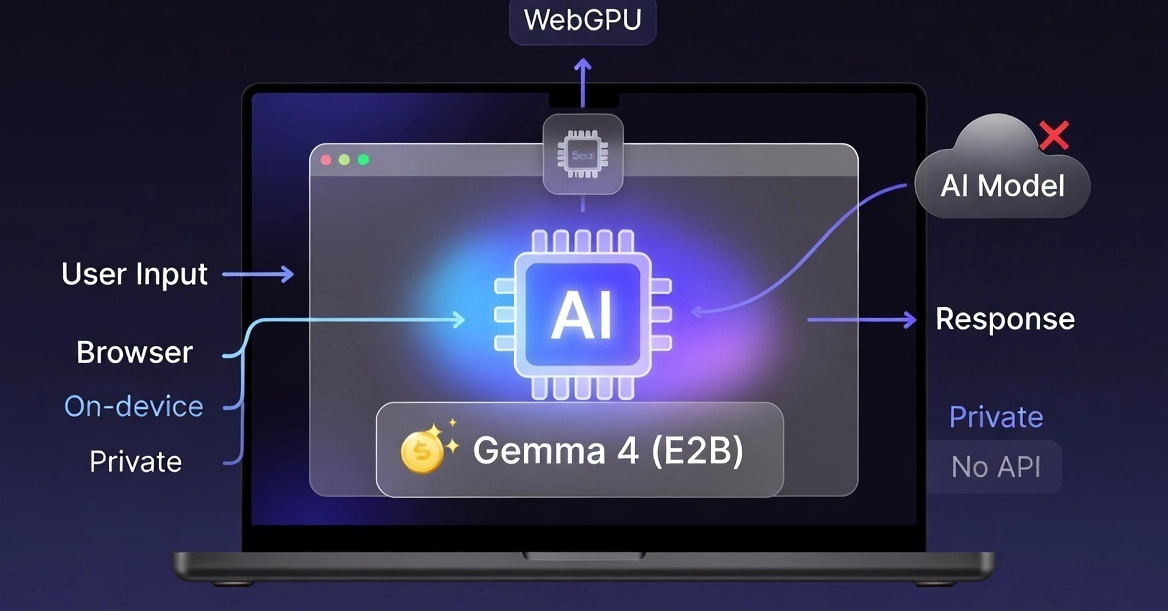
Running AI in the browser with Gemma 4? That’s the phrase buzzing now, and it’s not vaporware.
Everyone figured we’d be stuck chaining OpenAI calls forever—fat APIs, server bills stacking up, your users’ data slurped into some black box. But here’s Gemma 4, Google’s punchy little model family, landing like a mic drop: E2B and E4B variants small enough to cram into a single tab. No backend. No pinging distant servers. This changes everything for indie devs chasing snappy, private tools.
Look, browsers were never meant for heavy lifting. JavaScript chugged along with toy ML demos, while real work stayed server-side. Then WebGPU hits, WebAssembly matures—and bam. Gemma 4 exploits that stack ruthlessly.
How Gemma 4 Actually Runs in Your Browser
It’s dead simple under the hood. WebAssembly for the engine, WebGPU for parallel crunching pixels and tokens. You load it like this:
const llm = await LlmInference.createFromOptions({
  modelAssetPath: "/models/gemma-4-E2B.litertlm",
});
Streaming responses fire out. Tweak temperature, top-k, whatever. But don’t kid yourself—this ain’t plug-and-play magic.
You host the quantized model yourself (hundreds of MB, not gigs). Manage the decoding loop if you’re fancy. Skip that for custom pipelines, or watch your app choke.
Most “AI apps” today are just API wrappers. That’s fine… until you care about latency, cost, or privacy.
That’s the original wake-up call. Spot on.
And here’s my take—the unique angle nobody’s yelling about yet: this echoes Java applets in the ’90s. Browsers were compute sandboxes then, until plugins bloated everything and Flash killed the dream. Gemma 4 revives that native power, but smarter—no sandbox escapes needed. We’re not repeating history; we’re upgrading it.
Short para for punch: Trade-offs bite hard.
Raw models? Gigabytes, forget it. 4-bit quantized? Down to manageable MBs. Stick to E2B for most rigs—E4B’s for beasts only. And context? Don’t touch 128K unless you hate your users. Cap at 512 tokens maxTokens, or kiss smooth UI goodbye.
Stream everything. Web Workers for custom stuff. Else, typing lags, tabs freeze, bounce rates skyrocket.
Why Does Device Intelligence Matter for Gemma 4?
Assume nothing. Not every laptop’s a gaming PC.
Check WebGPU support first—Safari’s half-assed, mobile’s a crapshoot. Probe memory headroom. Fallback to an API if it whines.
Get this wrong, and low-end users rage-quit. It’s not optional; it’s survival.
Privacy seals the deal.
“Your data never leaves your device.” That’s not marketing — that’s architecture.
Pure truth. No logs, no leaks, no vendor lock. Agentic workflows? Multimodal (text, audio, vision)? All local. Your note summarizer stays yours. Offline coding helper? Ship it.
But Google’s PR spins this as ‘revolutionary’—call the hype. It’s evolutionary engineering on WebGPU’s shoulders. Credit where due: they nailed the quantization.
Keeping Your Gemma 4 App From Bloating to Death
Bloat kills browser apps faster than anything.
Wrong: Bundle the model in your JS, load at startup. Instant 500MB regret.
Right way—lazy load on user click:
if (userClicksAI) {
  loadModel();
}
Host models separately (/models/gemma-4-E2B.litertlm). Cache like mad—long headers, no redownloads. Progressive: Start E2B, upsell E4B later.
Nail this, your app flies. Botch it? Dead on arrival.
Real wins aren’t demos. Private doc parsers (OCR + reasoning). In-browser assistants that don’t phone home. Productivity tools for paranoid pros.
Brutal limits: Low-end phones? Nope. Heavy reasoning? Cloud it. SaaS scale? Servers still rule.
Is Gemma 4 the Death of AI APIs?
Not yet—but it’s a dagger.
We’re shifting from ‘AI as API’ to ‘AI as runtime.’ Browsers morph into compute platforms, just like JS did for web apps. Devs building education apps, private tools? This differentiates hard.
Prediction: By 2025, 30% of lightweight AI shifts browser-side. Agent workflows explode—local chains, no latency tax.
One para wonder: Momentum’s building.
Mistakes abound, though. Blind 128K contexts. No fallbacks. Bundling bloat. Avoid ‘em.
Devs, if you’re real-building (not tweet-demos), bake this in. System design flips: on-device first, API as backup.
The why? Architecture demands it. Latency under 100ms. Costs near-zero post-download. Privacy baked in.
And that applet parallel? Flash died from insecurity; this thrives on it.
Can My Device Run Gemma 4 in the Browser?
Test it. High-end? E4B flies. Mid-tier? E2B. Check WebGPU, RAM >4GB ideal.
Fallback smartly.
Real-World Fits for Browser Gemma 4
Productivity suites. Edtech offline modes. Dev helpers parsing docs local.
Massive edge over API slop.
Final shift: Browsers compute again. Benchmarks? Who cares. This is runtime reality.
🧬 Related Insights
- Read more: 90 Minutes to a Telegram AI Sidekick with OpenClaw: Clever Hack or Fancy Wrapper?
- Read more: Tabularis Brings SQL Notebooks Inside the Database Client — No More Copy-Paste Hell
Frequently Asked Questions
What does running AI in the browser with Gemma 4 mean?
It means loading quantized Gemma models via WebGPU/WebAssembly for local inference—no servers, low latency, full privacy.
Can I run Gemma 4 on a regular laptop?
Yes, E2B works on most modern laptops with WebGPU; check Chrome/Edge, 8GB RAM minimum for smooth sailing.
Will Gemma 4 replace cloud AI APIs?
Not fully—great for lightweight, private apps; heavy tasks still need servers, but it’s a huge leap for on-device workflows.