Here’s the thing: we’ve all been waiting for it. The moment AI stops being a fancy parlor trick and starts fundamentally rewiring how we create and consume information. Well, friends, we’re living in it. And Glance, a mobile-first content platform, just dropped a prime example of this platform shift in action. For ages, the promise was this. Process massive amounts of raw data, identify the nuggets of gold, and deliver them in a format that actually fits our twitchy, scrolling thumbs. Everyone expected a more efficient edit button, maybe some smarter auto-cropping. What they got instead is a glimpse into the future of automated content generation.
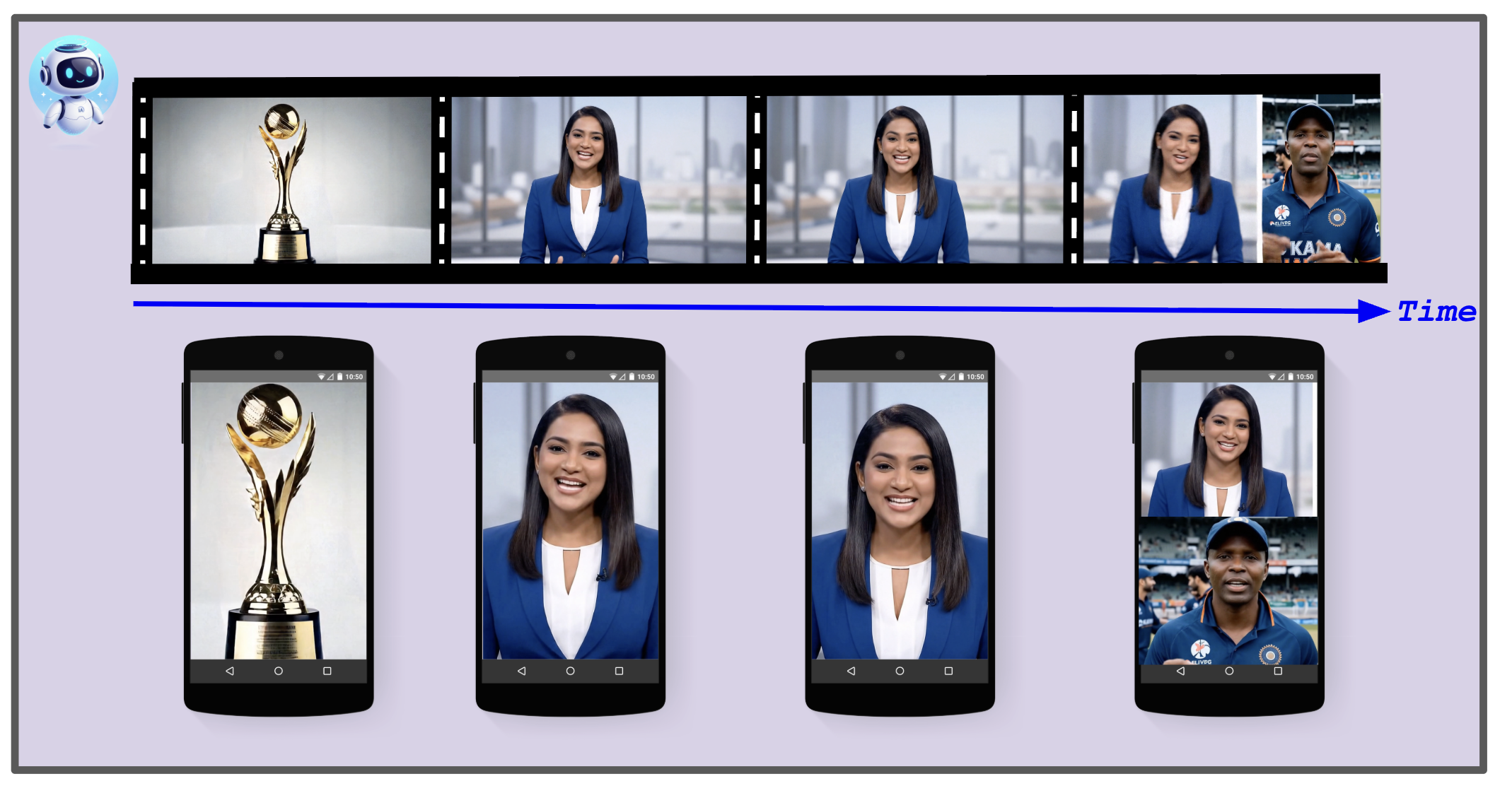
Glance is wrestling with a beast of a problem: taking 1-2 hour videos from podcasts, news, movies—you name it—and morphing them into 30-180 second vertical clips. This isn’t just about lopping off the ends; it’s about intelligent extraction. With daily volume projected to explode from 3,500 to over 10,000 videos, manual editing simply wasn’t going to cut it. It’s like trying to dig a tunnel with a teaspoon.
The core challenge goes beyond simple cropping. It demands an almost human-level understanding of context. Identifying the primary speaker, dynamically splitting screens for conversations, ensuring the viewer doesn’t miss a beat – this is where the magic, and the AI, truly happens.
The Lock Screen Revolution
Glance’s goal was crystal clear: build a pipeline that takes a landscape behemoth (16:9) and spits out multiple portrait-ready snacks (9:16). This required a whole suite of capabilities:
- Key Moment Identification: Finding the juiciest 60 seconds within hours of footage.
- Active Speaker Detection: Pinpointing who’s talking and centering them. This includes a smart check to differentiate a live person from a picture on the wall.
- Split Screen Detection: Recognizing interview formats and stacking speakers vertically, keeping that conversational flow intact.
- Intelligent Reframing: Making wide, multi-speaker shots work in a narrow vertical frame without losing the plot.
- Dynamic Caption Highlighting: Creating those ‘karaoke-style’ captions that are vital for silent mobile viewing.
- Automated Branding: Slapping on logos and overlays consistently – the unglamorous but essential stuff.
And the tools? They’ve gone full cloud-native. Think Google Cloud Speech-to-Text v2, the mighty Gemini (specifically, Gemini 2.5 Flash, codenamed ‘Nano Banana’ – delightful!), and the Google Vision API. For the heavy lifting on video manipulation, they’re using Samurai (an open-source tracker), OpenCV, and MoviePy. It’s a symphony of specialized AI tools working in concert.
The AI Conduit: How It Works
The whole operation breaks down into three main acts. Each module plays a critical role in transforming raw video into addictive mobile content.
Module 1 is all about extraction and identification. It churns out transcripts with pinpoint word-level timestamps. This accuracy is key; you don’t want your clips starting or ending a millisecond too soon or late. Generative AI is doing the heavy lifting here, analyzing text to find those optimal clip points.
The output of this first stage is a collection of short video clips, each perfectly paired with its time-aligned transcript. They’re then handed off to the star of the show: the Intelligent Reframing Engine.
This is where the real visual alchemy happens. Converting a wide 16:9 frame into a compelling 9:16 portrait view is a complex dance. A simple center crop would butcher most content, chopping off speakers or crucial action. Glance’s multi-stage scene analysis pipeline is the secret sauce.
Who’s Talking? The Liveness Test.
Before the engine can crop, it needs to know who is actually contributing to the conversation. This is done frame-by-frame using Google Cloud Vision API’s face detection. But here’s a neat trick: it’s not just finding faces, it’s checking if they’re live. This involves tracking facial landmarks – is the mouth moving? Is the head subtly shifting? A face needs to show consistent animation across these cues to be classified as a ‘live’ participant. It’s a clever way to avoid framing a static background graphic as the main speaker.
“A face must show consistent animation in these cues to be classified as a ‘live’ participant.”
Once a face is deemed live, an ‘activity score’ is calculated. This score factors in mouth openness and emotional fluctuation – think subtle shifts in joy or surprise detected by the Vision API. The primary speaker is then identified using a ‘liveness ratio’: the proportion of animated frames where the face appears. It’s an ingenious system for keeping the focus dynamic and relevant.
Why This Matters for Content Creators
This isn’t just a technical feat for Glance; it’s a paradigm shift for content creators everywhere. The ability to automatically repurpose long-form content into snackable, mobile-first clips democratizes distribution. Think smaller creators who lack the resources for extensive editing teams, or large media companies trying to maximize reach across platforms. This technology makes sophisticated content adaptation accessible. It’s like giving everyone a Hollywood-grade editing suite, but it runs on AI. This level of automation allows for a velocity of content production that was previously unimaginable, especially for mobile-first platforms where attention spans are measured in seconds.
The Future of Video Content
What Glance is doing here isn’t just about saving time; it’s about redefining how we experience video. We’re moving from a passive consumption model where you had to sit through an hour-long documentary to an active, curated experience where the most engaging moments are served to you, optimized for the device in your hand. This AI-driven approach ensures that valuable content isn’t lost in the shuffle of endless feeds. It’s a win for creators looking for reach and a win for users drowning in an ocean of digital noise, finally getting the signal clearly and concisely.
What’s Next for Glance?
With daily volumes set to surge, the scalability of this AI pipeline is paramount. The integration of Gemini 2.5 Flash signals a commitment to utilizing cutting-edge generative AI for increasingly nuanced content analysis. We can expect Glance to refine its key moment identification, perhaps incorporating sentiment analysis directly from the video, or even predicting viewer engagement based on specific visual and auditory cues. The future isn’t just about making clips; it’s about making predictively engaging clips.
**
🧬 Related Insights
- Read more: NVIDIA’s Nemotron and OpenManus Are Crushing the $31B AI Agent Hype Machine
- Read more: ESP32 Spotify Display’s Clever Cloudflare Backbone: Secure, Shared, and Surprisingly Efficient
Frequently Asked Questions**
What does Glance do? Glance is a mobile-first content platform that uses AI to transform long-form videos into short, vertical clips optimized for mobile viewing.
How does Glance use AI to make video clips? Glance employs Google Cloud’s AI services, including Speech-to-Text, Gemini, and Vision API, to identify key moments, detect speakers, intelligently reframe video, and add dynamic captions.
Will this AI replace video editors? While AI tools like Glance’s can automate many repetitive tasks and content repurposing, the need for human creativity, storytelling, and final quality assurance in video editing will likely persist. This AI augments, rather than fully replaces, the human element.