Twenty seconds. That’s how long some developers are waiting for their AI models to wake up on Cloud Run. It’s a frustrating pause, and frankly, a deal-breaker for many. I saw the Reddit thread, the despair practically dripped off the screen. People were abandoning serverless GPUs, migrating back to the clunky embrace of GKE just to escape this agonizing startup latency. It’s enough to make you wonder if managing infrastructure yourself is just… simpler. But is it? Or are we just resigned to the complexity?
Look, I’ve been pounding the pavement in Silicon Valley for two decades. I’ve seen countless buzzwords come and go, promises evaporate faster than a free lunch. And when I hear about AI models on serverless platforms, my ears perk up. Not because I’m a believer in the hype, but because I’m always looking for the angle: who’s actually making money here, and who’s stuck with the tab? This latest kerfuffle over Cloud Run AI cold starts feels familiar. It’s the same old dance: promise of effortless scaling, then the brutal reality of operational pain.
Shir Meir Lador over at Google Cloud Developer Relations claims they’ve found that “sane way.” They presented at Google Cloud Next ‘26, apparently. Their colleague, Ajay Nair from Elastic — a company that’s no stranger to handling mountains of data and requests — apparently shared how Elastic manages millions of daily requests across seventeen-plus model variants on Cloud Run. Seventeen. Variants. All while keeping their “scale-to-zero” dream alive. The takeaway? Treat GPUs like… well, compute. Not some precious snowflake infrastructure you have to babysit.
The Four-Act Play of AI Startup Hell
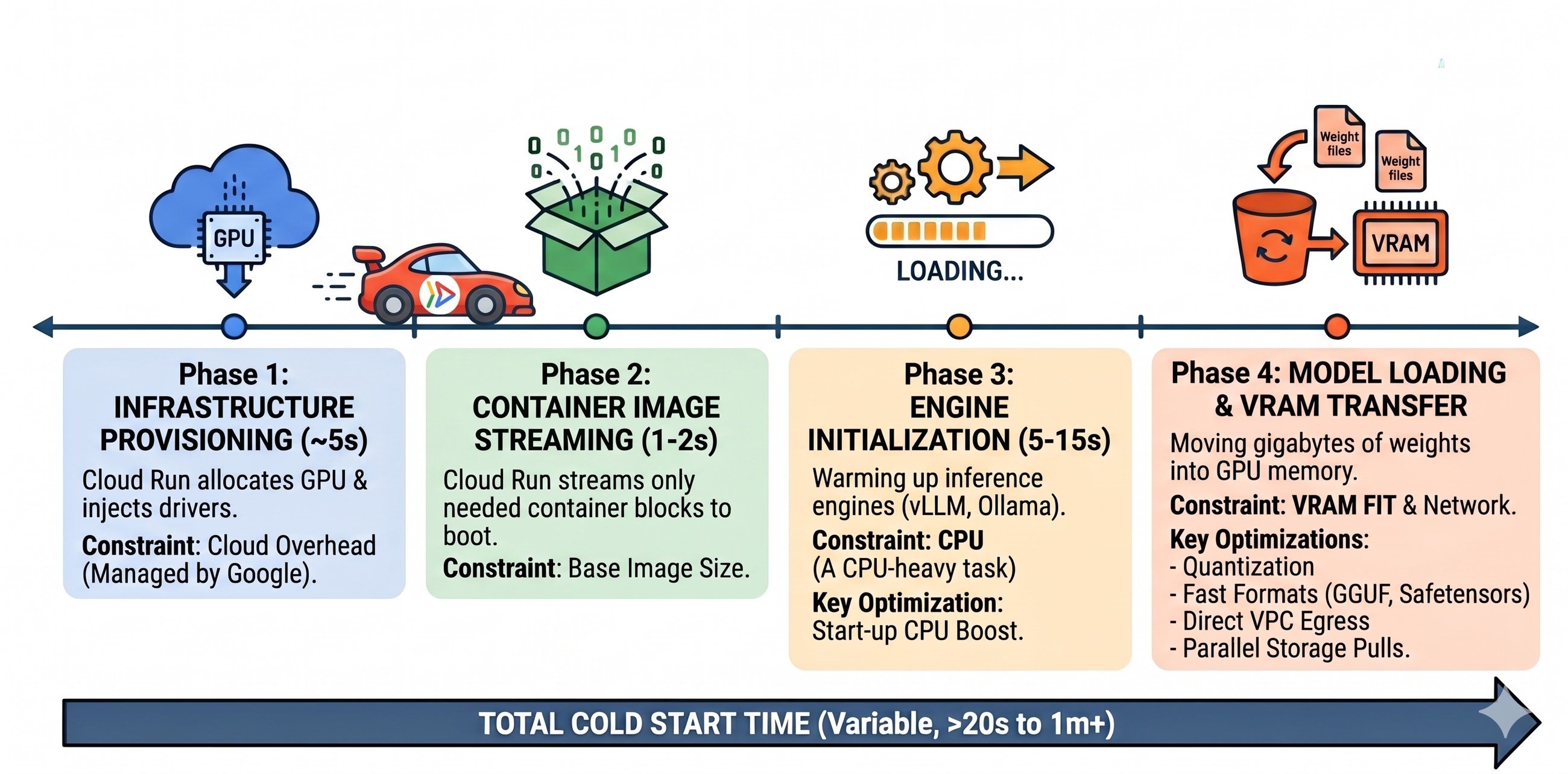
So, what’s going on under the hood when your AI model decides to wake up? It’s not just firing up a web server. This is a four-phase ordeal, and if any single part stumbles, your user’s left staring at a spinning wheel.
Phase 1: Infrastructure Provisioning. About five seconds. Cloud Run figures out where to plop your model – grabbing a physical GPU and shoehorning in NVIDIA drivers. The nice part here, they say, is Google handles the drivers. You don’t have to bloat your Docker image with that headache. Good.
Phase 2: Container Image Streaming. One to two seconds. This is where Cloud Run pulls only the bits it needs to get going. Apparently, your 15GB CUDA image can boot up as fast as some tiny Node.js app. Sounds slick, if true.
Phase 3: Engine Initialization. Five to fifteen seconds. This is the heavy lifting. Your inference engine, be it vLLM or Ollama, is warming up. It’s a CPU-guzzling beast, and Lador claims this is where most folks trip up without even realizing it. So, that’s one potential black hole.
Phase 4: Model Loading & VRAM Transfer. The grand finale. Moving those gigabytes of weights from storage into the GPU’s precious memory. This is where the rubber meets the road for AI. Unlike your typical web app where CPU reigns supreme, here, VRAM is king. If your model’s weights don’t fit neatly into that GPU memory, performance nosedives as the system starts swapping to slower system RAM. A death sentence for latency.
Who’s Actually Making Money Here? (Hint: It’s Not Always the User)
This whole dance around cold starts, especially with GPUs, makes me wonder about the economic incentives. Google, of course, wants everyone on their cloud. They’re selling compute, storage, and network. And serverless promises them a steady stream of their customers, paying for every second the GPU is lit up. But the user, the developer, the one trying to deliver a good experience? They’re the ones footing the bill for those agonizing 20 seconds, or worse, losing customers because of it. It’s a classic Silicon Valley trade-off: convenience for them, potential pain for you.
Cutting Down the Wait: Practical Hacks
So, how do you sidestep this whole mess? Lador’s team offers some pointers, straight from the Google Cloud playbook.
First, tackle Phase 4. Picking the right deployment option is key. They’re pushing for Cloud Storage (Concurrent Download) using gcloud storage cp. Their argument is that this method maximizes network throughput, which is crucial for those massive weight files. Faster download, faster load. Makes sense.
Then there’s Cloud Storage (FUSE). This one’s touted as “zero-code” for mounting buckets. Sounds easy, right? But beware: it’s slower for large models because it doesn’t parallelize the initial download. So, convenience might cost you seconds.
Baking weights into your container image is apparently best for models under 10GB, thanks to that image streaming magic. But cross that threshold, and the overhead becomes a bottleneck. And for the love of sanity, avoid loading directly from the internet. Slowest. Most unpredictable. Definitely not for production.
Now, about the model itself. This is where the real optimization happens. Smaller, more efficient files are your best friend. 4-bit Quantization is called the “ultimate cold start hack.” Fewer gigabytes to move means a faster transfer. Simple physics, really.
And don’t forget model formats. Using things like GGUF promises faster load times. For the absolute quickest startup, ditch Python’s “pickle” files and go for Safetensors. They claim “zero-copy loading,” which sounds pretty sweet when you’re trying to shave milliseconds off a 20-second wait.
But here’s the kicker, and something they almost gloss over: Ensure VRAM Fit. This ties back to quantization. If your model doesn’t fit entirely into the GPU’s memory, you’re toast. That Phase 4 will grind to a halt as it tries to cram a square peg into a round hole, swapping to system RAM.
The Long Game: Beyond the Cold Start
What’s missing from this Google-centric view? The broader context. This focus on cold starts is necessary, sure, but it doesn’t address the fundamental cost of running GPUs in the cloud. Even with optimizations, serverless GPUs can still be pricey. Companies like Elastic can probably absorb that cost because their service is so pervasive. For smaller outfits or those just experimenting, the equation might not add up, no matter how fast the cold start.
Is this a “sane way”? It’s a way. It’s an attempt to wrangle complexity. But let’s be clear: managing AI workloads, especially with GPUs, is inherently complex. It’s not going to magically become trivial. You’re still dealing with massive datasets, specialized hardware, and complex software stacks. Cloud Run might smooth out some edges, but it doesn’t eliminate the underlying challenges. And if those 20-second waits are the norm, “sane” is still a long shot.
It reminds me of the early days of managed Kubernetes. Everyone cheered about not managing clusters, but then you just ended up managing pods and deployments on top of a still-complex system. This feels similar. We’re trading one set of operational headaches for another, hoping the trade-off is worth it.
FAQs
What does Cloud Run AI cold start mean? It’s the delay when your AI model on Cloud Run needs to start up, requiring infrastructure provisioning, container image loading, engine initialization, and model weight transfer to the GPU.
Will this fix my 20-second AI cold start problem? By optimizing model loading, using efficient formats, and ensuring VRAM fit, you can significantly reduce cold start times. However, absolute elimination depends on numerous factors.
Is serverless for AI models really cheaper than GKE? It can be if your workload is sporadic and scales to zero effectively. However, consistent, high-demand GPU usage might still be more cost-effective on managed Kubernetes like GKE.