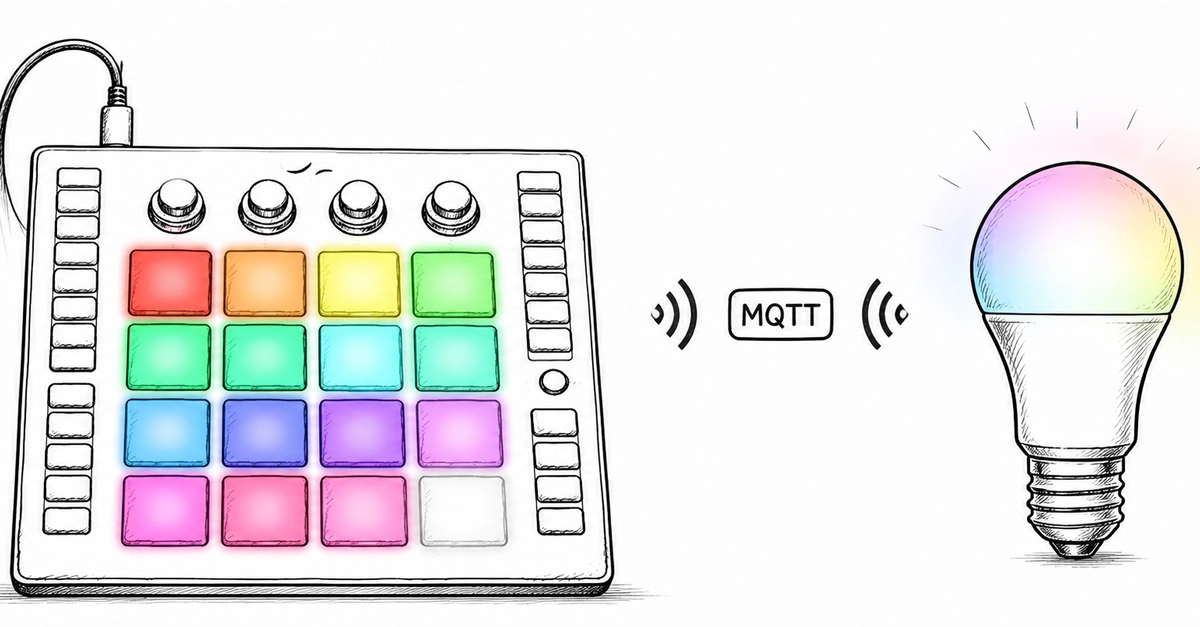
The glow pulsed, a soft spectrum shifting across the ceiling, not from a pre-programmed routine, but from a physical touch on a colorful pad. This isn’t some high-end studio installation; it’s a weekend project, a proof to how readily available hardware and a bit of clever code can unravel complex systems. We’re talking about a $15 WiFi bulb, a MIDI controller that looks like it belongs on a DJ’s deck, and an AI agent, all orchestrated into a surprisingly functional — and frankly, cool — physical interface.
This is the kind of hands-on hacking that DevTools Feed lives for. It bypasses the usual corporate announcements and marketing fluff, diving straight into the messy, wonderful world of maker ingenuity. The project, born from a Friday evening whim, combines off-the-shelf components with an open-source ethos to create something that feels more personal, more immediate, than any app ever could.
At its heart is the Kauf Bulb, a surprisingly capable little device that lands on Amazon for about $15. Its secret sauce? An ESP32 microcontroller and, crucially, pre-loaded ESPHome firmware. This isn’t just another generic smart bulb that traps you in its manufacturer’s app. No, the ESPHome integration means it’s ready for local control from the get-go. You get a REST API right out of the box, and setting up an MQTT broker is a breeze. Or, if you’re feeling particularly adventurous, you can flash entirely custom firmware. It’s the antithesis of vendor lock-in, a small beacon of open control in a sea of closed ecosystems.
Then there’s the Presonus ATOM, a MIDI controller typically found in music production studios. At around $136, it’s not exactly pocket change, but its 16 velocity-sensitive RGB pads and four rotary knobs are far from typical smart home fare. The beauty here is MIDI’s universality. It’s a simple, strong protocol that’s been the backbone of digital music for decades, and here it’s repurposed as a direct physical input for light control. Each pad is assigned a color, and the knobs? They’re handling the finer points: brightness and the individual Red, Green, and Blue channels.
Bridging the Physical and Digital Divide
The initial setup involves configuring the Kauf Bulb via its ESPHome YAML file. Think WiFi credentials, MQTT broker address, and a topic prefix. The author pulls in the Kiro CLI — an AI agent designed to assist with configuration tasks — to generate the necessary files, a neat trick that highlights how AI can streamline even the more mundane aspects of hardware projects. A simple esphome run kauf_bulb.yaml command later, and the bulb is ready to receive commands. It’s a process that underscores the accessibility of modern IoT development; it’s no longer the exclusive domain of seasoned embedded engineers.
Once configured, the 16 pads on the ATOM transform into a tactile color palette. Red, Orange, Yellow, all the way to shades of White and Coral. Press a pad, and the Kauf Bulb mirrors that color. The system initially operates via direct HTTP requests to the bulb’s local API. This method offers near-instantaneous response, zero perceptible latency when both devices are on the same network. It’s direct, it’s fast, and it feels incredibly responsive.
But the real magic, the scalability, comes with the switch to MQTT. This open-source messaging protocol allows the commands to traverse networks, opening up possibilities for remote control and integration with larger smart home systems. The author demonstrates this with Python code, using paho-mqtt to publish JSON payloads containing the desired state and color values. This shift from local HTTP to MQTT isn’t just a technical tweak; it’s an architectural upgrade that broadens the project’s scope considerably.
This project offers a tangible way to interact with your smart home, moving beyond screens and voice assistants to a more intuitive, physical interface.
The implications here are significant. We’re seeing a clear architectural shift in how we can interface with smart devices. Instead of relying on cloud-based apps or proprietary ecosystems, we can use low-cost hardware, standardized protocols like MQTT, and the increasingly powerful — and accessible — AI assistants for configuration. It democratizes smart home control, putting the power back into the hands of the user, the maker, the tinkerer.
This isn’t about replacing Alexa or Google Assistant; it’s about augmenting them, or in this case, creating an entirely separate, highly personalized control scheme. The author’s ability to map physical pads to specific color values, and then use knobs for precise adjustments, offers a level of granular control that abstract interfaces often struggle to replicate. It’s a reminder that sometimes, the best way to interact with technology is with your hands.
And let’s not forget the underlying AI component. While Kiro CLI’s role here was primarily configuration assistance, its inclusion hints at a future where AI agents don’t just understand our needs but actively help us build the tools to meet them. Imagine generating complex automation scripts or custom hardware interfaces with simple natural language prompts. This project, though focused on light control, is a small step in that direction, showcasing the synergy between hardware hacking, open protocols, and intelligent automation assistants.
It’s a project that’s both fun and deeply instructive. It shows that a sophisticated, personalized smart home experience doesn’t require a fortune or a team of engineers. It requires curiosity, a willingness to get your hands dirty, and an understanding of how fundamental technologies like ESPHome and MQTT can be combined in novel ways. The future of smart devices might not be about more features, but about more flexible and personal ways to control them. This is one such way.
Why Does This Physical Controller Matter?
In an age dominated by touchscreens and voice commands, the resurgence of physical interfaces for smart home control is noteworthy. This project highlights how dedicated hardware, like the Presonus ATOM, can offer a more immediate and intuitive user experience. The tactile feedback of buttons and knobs, combined with programmable LEDs, creates a direct connection between the user’s action and the device’s response, something often lost in abstract digital interfaces. It’s about reducing cognitive load and increasing physical engagement, making technology feel less like a tool to be commanded and more like an extension of one’s environment.
The integration of a low-cost, ESPHome-enabled bulb is also critical. It bypasses the need for expensive proprietary hubs and offers a direct, local control mechanism, enhancing privacy and reliability. By relying on protocols like MQTT, the system becomes highly interoperable, capable of communicating with a wide range of other smart devices and platforms. This fosters an ecosystem of user-defined solutions rather than being confined to a single vendor’s roadmap.
The AI Assist: A New Frontier in Configuration?
The use of Kiro CLI to generate configuration files offers a glimpse into how AI can abstract away some of the more tedious aspects of embedded development and system integration. For developers and hobbyists alike, AI assistants that can translate natural language requests into functional code or configuration snippets significantly lower the barrier to entry. This project demonstrates that AI’s role in DIY tech isn’t just about complex algorithms but also about practical, everyday assistance in building and managing our connected devices. It’s about making the advanced accessible.
🧬 Related Insights
- Read more: PeachBot: Edge AI That Actually Survives the Real World
- Read more: AWS Elemental Inference: Live Video Goes Vertical in Seconds
Frequently Asked Questions
What is ESPHome? ESPHome is an open-source firmware that makes it easy to control ESP8266 and ESP32 microcontrollers with simple YAML configuration files and integrate them into home automation systems. It enables local control without cloud dependencies.
Can I use any MIDI controller with this setup? Potentially, yes. Any MIDI controller that can send MIDI note-on/note-off messages and control change (CC) messages for knobs can be adapted. The specific mapping would need to be adjusted in the software to match the controller’s output.
Will this project save me money? While the initial hardware cost for the components (bulb, MIDI controller) is an investment, the approach prioritizes long-term cost savings by avoiding proprietary software subscriptions and cloud fees, and by enabling custom, DIY solutions.