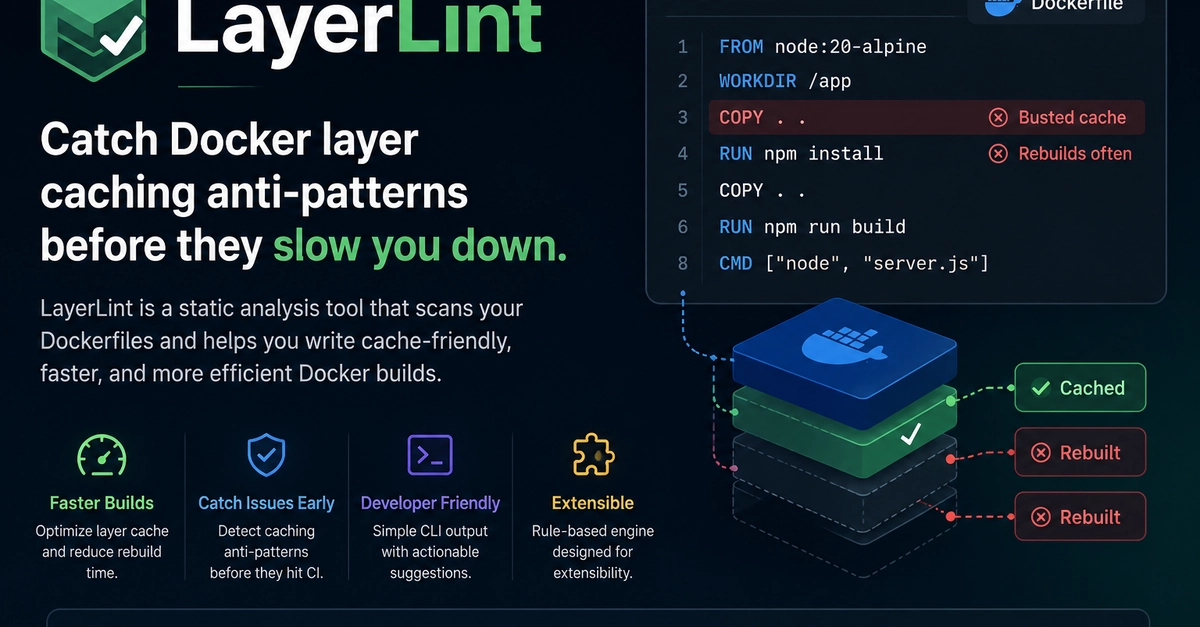
Are your Docker builds taking an eternity because you changed a comma?
Because that’s the vibe I’m getting from this whole Docker layer caching kerfuffle. You know the drill. You tweak one insignificant line of code, push it to CI, and BAM. Suddenly, your machine sounds like it’s trying to launch a rocket as Docker decides it needs to re-download half the internet. Again.
And the worst part? The official documentation, bless its heart, usually glosses over this with the enthusiasm of a tax audit. They tell you to COPY . . and then RUN npm install, leaving you to discover the painful reality of cache invalidation the hard way. We’ve all been there, staring at the screen, wondering if the problem is your code, the cloud, or just the universe conspiring against your deploy.
Here’s the dirt: your build isn’t slow because your code is inherently ‘bad’ or because your cloud provider is having a bad day. It’s slow because, frankly, you’ve probably written your Dockerfile wrong. And hey, who can blame you? Nobody really sits you down and explains the pancake analogy of cache layers.
The Pancake Problem: A Layer-by-Layer Breakdown
Think of your Dockerfile like a stack of pancakes. Every command — FROM, COPY, RUN — is a pancake. Docker, in its infinite wisdom, caches these pancakes. Brilliant, right? Until you change one.
And here’s the kicker: when you change any pancake in the stack, Docker chucks that pancake and every single pancake above it into the trash. Forever. Gone. Kaput.
So, if you’ve got a line like COPY . . early in your Dockerfile, and then you run RUN npm install, that npm install layer is toast every time anything in your project directory changes. You’re reinstalling dependencies because you moved a file an inch to the left.
This is the “invalidation chain” they whisper about in hushed tones at DevOps conferences. It’s the silent killer of build times.
The Classic, Painful Mistake
Remember this gem?
FROM node:18
WORKDIR /app
COPY . . # Layer 1: Copies *everything*
RUN npm install # Layer 2: Installs deps
RUN npm run build # Layer 3: Builds your app
CMD ["node", "dist/server.js"]
Change one little file in your src directory? Boom. Layer 1 (COPY . .) is invalidated. Which means Layer 2 (npm install) has to run again. And because Layer 2 ran, Layer 3 (npm run build) also has to run. You’ve just spent five minutes downloading packages because you added a space.
The Sanity Saver: A Better Way
This is where the magic happens. Instead of copying everything at once, be surgical.
FROM node:18
WORKDIR /app
COPY package.json package-lock.json ./
RUN npm install
COPY . .
RUN npm run build
CMD ["node", "dist/server.js"]
Now, when src/index.js changes:
- The first
COPY package.json package-lock.json ./layer? Still good. Cached. - The
RUN npm install? Still good. Cached. - The second
COPY . .? Okay, that one changed. Rebuild. - The
RUN npm run build? Gotta rebuild that too.
You saved yourself the npm install pain. That’s minutes saved, per build. Multiplied by dozens of developers, hundreds of builds a day? We’re talking actual, tangible productivity gains. Who’s making money? The folks who aren’t wasting precious developer time.
This pattern isn’t unique to Node.js:
- Go:
COPY go.mod go.sum ./ RUN go mod download - Python:
COPY requirements.txt . RUN pip install -r requirements.txt - Rust:
COPY Cargo.toml Cargo.lock .
RUN cargo build --release
(or similar)
It’s about isolating dependency installation from your actual application code.
Enter LayerLint: Your Dockerfile Grinch
So, after enduring this particular brand of slow-build torture for what feels like a decade, the author of the original piece—let’s call him Vivekh—got tired of it. He built LayerLint. It’s a static analysis tool. Point it at your Dockerfile, and it’ll tell you where you’re messing up the cache, no build required. Think of it as that nagging engineer who only cares about build speed, but without the passive-aggressive Slack messages.
It’s not trying to replace linters like hadolint (which, by the way, is great for general Dockerfile hygiene). LayerLint is laser-focused on this specific, painful anti-pattern of cache invalidation.
LayerLint is specifically focused on layer caching anti-patterns. The stuff that makes your builds slow.
It’s a small thing, but when you’re staring down a 10-minute build for a trivial change, those small things add up to a mountain of wasted time. And wasted time is wasted money.
So, yeah. Your Docker builds are slow because you’re doing it wrong. And now, maybe, you have a tool to help prove it.
🧬 Related Insights
- Read more: Ditch the Video Processing Nightmare: Scale to 1,000 Clips a Day for $25
- Read more: OCP’s Big Lie: Stop Guessing the Future
Frequently Asked Questions
What does LayerLint actually do?
LayerLint is a static analysis tool that scans your Dockerfile to identify anti-patterns that lead to slow build times due to inefficient layer caching. It checks the order of your commands, like COPY and RUN, to ensure dependencies are installed before your source code is copied.
Will this tool fix all my slow Docker builds? It’s designed to tackle a very specific and common cause of slow builds: poor Docker layer caching. If your builds are slow for other reasons (e.g., extremely large base images, complex multi-stage builds with inefficient steps, or network bottlenecks during image pulls), LayerLint might not address those specific issues.
Is LayerLint better than Hadolint? Hadolint is excellent for general Dockerfile best practices, syntax checking, and security recommendations. LayerLint is specialized; it focuses solely on optimizing Docker layer caching to speed up build times. They serve different, complementary purposes.