Deploying Gogs Simple Git Hosting on Ubuntu 24.04
So, what did we all expect? A revolution in private Git hosting? Probably not. We expected a clear, concise way to ditch GitHub or GitLab for that personal project or a small team. And this guide? It delivers on that. Mostly. It’s about getting Gogs — that lightweight, Go-written Git server — humming on Ubuntu 24.04. The catch? It’s not a push-button affair. You’re going to wrangle Docker Compose and Traefik. Which, if you’re already nodding along, is exactly what you want. If you were hoping for magic, well, keep dreaming.
Is This the Future of Self-Hosted Git?
Let’s not get ahead of ourselves. Gogs isn’t new. It’s been around, chugging along happily on modest hardware for ages. What’s new here is the method. The original article nudges you towards Docker Compose with Traefik for the full treatment: automatic HTTPS, SSH on a non-standard port (2222, because why not?), and all the niceties. It’s the modern way to package and deploy. It isolates dependencies. It makes for a reproducible setup. But let’s be clear: this is deploying a known quantity using established tooling. It’s less a ‘new release’ and more a ‘new recipe’.
The core promise of Gogs remains: fast, simple, easy. For those drowning in the complexity of larger solutions, or frankly, the pricing of hosted services, Gogs has always been the sensible, quiet neighbour. This guide just gives it a slightly shinier, more insulated wrapper for Ubuntu 24.04.
Gogs (Go Git Service) is a lightweight, self-hosted Git server written in Go, designed to be fast, simple, and easy to run on modest hardware.
This isn’t the headline for a tech IPO, is it? It’s a statement of fact. And that’s Gogs’ strength. It’s not trying to be everything to everyone. It’s just a damn good Git server.
Why Does This Matter for Developers?
Because sometimes, you just want your own damn Git server. Without the overhead. Without the enterprise features you’ll never touch. Without the constant fear of a price hike. This guide offers a path. It’s for the tinkerer, the privacy advocate, the team that’s outgrown shared hosting but isn’t ready for a full-blown DevOps platform.
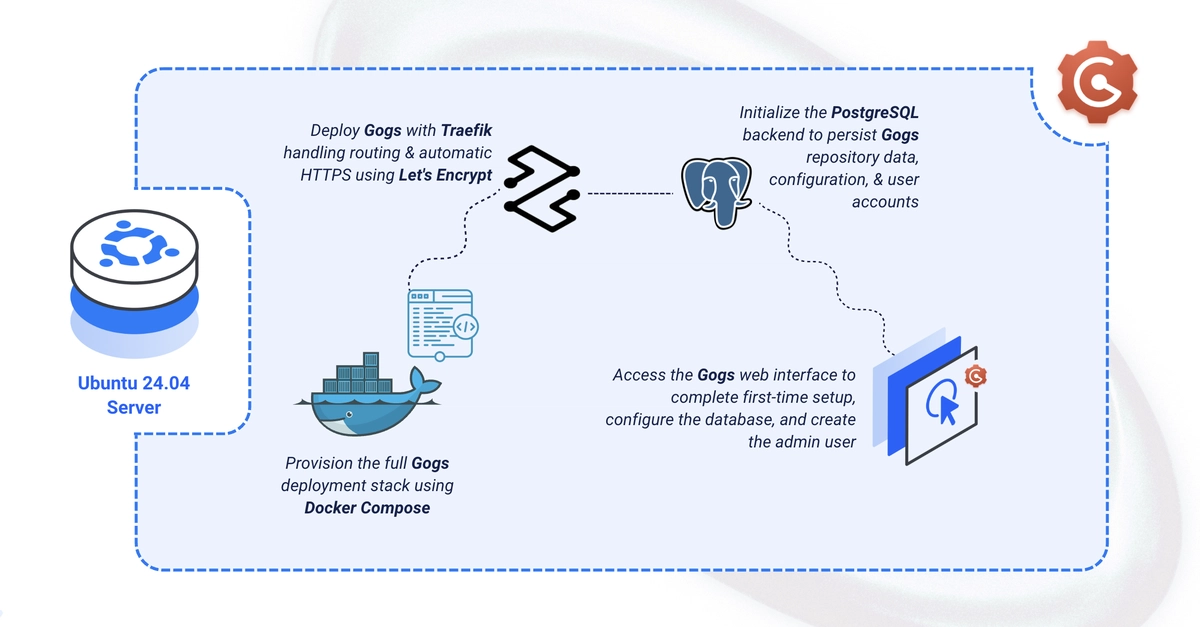
The inclusion of Traefik is key here. Automatic SSL? Check. Reverse proxying? Check. It’s the difference between a functional, but possibly insecure, setup and one that’s ready for prime time. The steps are laid out clearly: create directories, set up an environment file, get your user into the Docker group (a classic move, that), craft your <a href="/tag/docker-compose/">docker-compose</a>.yml, and then… docker compose up -d. Simple enough, assuming Docker is already your friend.
The installation form itself is refreshingly bare-bones. Database host: db:5432. Credentials from .env. SSH port: 2222. Application URL: https://gogs.example.com/. It’s almost quaint. Like ordering from a diner menu instead of a molecular gastronomy tasting experience.
My unique insight here? This isn’t just about Gogs. It’s a quiet proof to the enduring appeal of simplicity in an increasingly complex world. While giants like GitHub and GitLab are busy building empires, the real value often lies in the elegant, focused tool. Gogs, packaged this way, is a perfect example. It’s the anti-monolith.
The Devil’s in the Details (and the .env file)
You’d be forgiven for thinking this is the easy part. And for the most part, it is. You’re just plugging in your desired credentials and domain names. But this is also where the first tripwires appear. Forget to set a strong password for your PostgreSQL user? Oops. Mistype your domain name? Hello, broken SSL. The guide shows you the .env file, but the real work is ensuring what you put in there is sensible and secure.
Then there’s the docker-compose.yml itself. It’s a dense block of configuration. Traefik’s configuration, in particular, is a bit of a beast. The lines - "--providers.docker=true", - "--providers.docker.exposedbydefault=false" — these are crucial. They tell Traefik to pay attention to Docker labels, but not to expose everything willy-nilly. The HTTPS redirection? Standard fare, but elegantly handled. The gogs service section, with its labels pointing to Traefik (traefik.enable=true and so on), is where the magic happens, linking your domain to the Gogs container.
One tiny quibble, and it’s a minor one, is the SSH port. 2222. Fine. But it means remembering to add that port when cloning or pushing. git clone ssh://[email protected]:2222/user/repo.git. It’s a small detail, but small details trip up real people.
What Happens After the Install?
You’ve got Gogs. You can create repos. You can invite collaborators. You can push and pull. All the standard Git stuff. The guide mentions configuring SMTP for notifications and webhooks for CI. These are the next logical steps. If you’re using this for a serious project, you’ll absolutely want email notifications for commits, merge requests, and the like. Webhooks are your gateway to automating builds, deployments, and tests.
This guide is the foundation. It gets you the house. Furnishing it, connecting utilities, painting the walls — that’s up to you. But having a solid, self-hosted Git foundation that you control? That’s a win. It’s not about chasing the latest AI-powered code generation tool. It’s about control. Ownership. And the quiet satisfaction of running your own infrastructure.
🧬 Related Insights
- Read more: SpaceEstate: One Dev’s Caffeine-Fueled Quest to Sell You a Chunk of Mars
- Read more: Kubernetes Spins Up AI Gateway Working Group as AI Workloads Flood Clusters
Frequently Asked Questions
What is Gogs? Gogs is a lightweight, self-hosted Git service written in Go, designed for ease of use and minimal resource consumption.
Is Gogs free? Yes, Gogs is open-source and free to use.
Do I need Docker to install Gogs? While this guide uses Docker Compose for ease of deployment and management, Gogs can also be installed directly on a server.
How do I access Gogs after installation? You access Gogs via a web browser at the domain you configured during setup, typically over HTTPS.